

Visual Story Editor for Vertical Series: Map Episodes Before You Draft
If your episode board lives in one app, your script draft in another, and feedback in a chain of messages nobody can fully trace, the problem is not your story. It is your system. A visual story editor for writers exists to fix exactly that, especially when you are building episodic, branching, short-form drama where one missed beat can ripple across ten scenes and three character paths.
For writers working in vertical series, the old workflow breaks surprisingly fast. A linear document can hold dialogue beautifully, but it is poor at showing choice points, dead ends, parallel threads and episode-level pacing. Once the project moves beyond a simple pilot, you start spending more time finding the shape of the story than actually writing it.
That is where a visual layer changes the work. Not because diagrams are fashionable, but because story structure is spatial. Writers already think in moves, reversals, consequences and arcs. A node-based canvas simply makes those relationships visible, so you can test the logic of a story before production exposes every weak link.
What a visual story editor for writers actually does
At its best, a visual story editor is not a whiteboard pretending to be writing software. It is a story development environment built around the way narratives branch, connect and evolve. Instead of forcing everything into a stack of pages, it lets you map scenes as units, connect them through cause and effect, and keep writing attached to the structure rather than separated from it.
For episodic storytellers, that matters. When a cliffhanger in episode three needs to pay off in episode six, you want to see the chain. When one audience-facing choice opens two future paths, you need to understand what that means for pacing, runtime and character continuity. In a standard document, those dependencies are abstract. In a visual system, they sit in front of you.
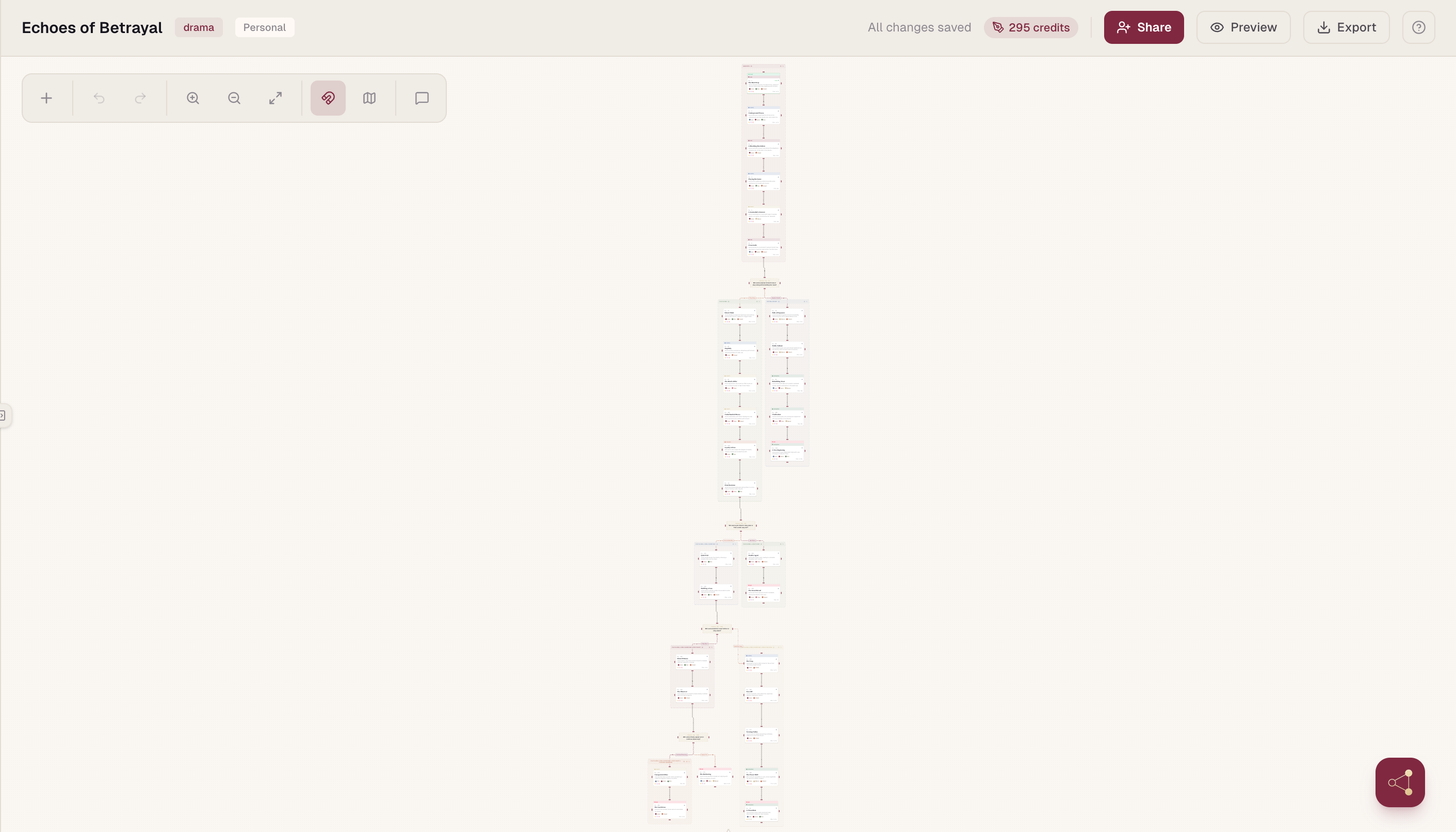
The real value is not just clarity. It is speed with control. You can move a beat, split a branch, collapse an episode, or compare alternate paths without tearing apart the whole draft. For solo writers, that means less friction. For teams, it means fewer expensive misunderstandings.
Why this matters more in branching and vertical drama
Short-form serial content has no patience for narrative drift. Every episode has to land quickly, escalate cleanly and earn the next tap. In branching drama, the pressure is even higher because the story is not only moving forward. It is multiplying.
That creates three practical problems:
Visibility. Once the narrative branches, it becomes harder to track where each decision leads and whether those paths stay emotionally consistent.
Version control. When multiple people are shaping structure and script at once, disconnected files create confusion almost immediately.
Production readiness. An idea that looks elegant in an outline can become a scheduling headache if scene logic, episode flow and script formatting are all handled separately.
A visual editor helps because it brings narrative architecture into the same working space as writing. You are no longer outlining in broad strokes and then hoping the script catches up. You are designing the narrative system and drafting inside it.
That distinction matters. A branching story is not just a plot with options. It is a decision tree with emotional consequences, production implications and audience retention stakes.
Tools built for straightforward feature scripts often struggle here because they assume one line of progress. Mobile-first episodic storytelling rarely behaves that neatly.
The shift from outline to production
Most writers know the pain of rebuilding. You sketch the story in cards or notes, move into a draft, then realise the structure does not hold. So you go back, patch the outline, revise the script, update the team, and hope nobody is working from the wrong version.
A strong visual story editor compresses that loop. Scene planning, branch logic and script development happen in one place, so changes carry through the workflow instead of creating parallel realities. That is not a small convenience. It changes how quickly a project can mature.
For studios and writer-led teams, this also creates a clearer path into production:
- Producers can understand story flow at a glance
- Collaborators can comment in context
- Writers can keep creative intent visible while the project gains operational structure
When episode order, branch relationships and script content live together, handoff becomes cleaner. This is one reason platforms like Scenvii are gaining traction with creators building serial vertical drama. The point is not simply to write scripts online. It is to reduce the gap between story development and production reality.
What to look for in a visual story editor for writers
Not every visual tool is built for story work, and not every writing app understands branching structure. The useful question is not whether a platform has boxes and lines. It is whether those visual elements are meaningfully tied to the writing process.
Scene-level story units
The editor should treat scenes or beats as workable story units, not generic shapes. You should be able to move quickly from structure into script without losing context.
Readable branching at scale
The platform should support branching logic in a way that remains clear as complexity grows. A simple demo map is easy. A 40-scene branching episode arc is where weak tools start to collapse.
Integrated collaboration
If your team is developing episodes together, comments and edits need to happen in the same environment as the story map. Otherwise, you are back to scattered feedback and duplicated effort.
Import and export
This matters particularly if you need to bring existing drafts into the system or hand material off in industry-friendly formats later.
Thinking support, not just storage
A good visual editor sharpens decision-making. It shows narrative gaps, overloaded branches, thin character turns and repetitive beat patterns early enough to fix them.
Trade-offs writers should be honest about
A visual workflow is not automatically better for every writer or every project. If you are drafting a straightforward linear script with minimal collaboration, a traditional script editor may be enough. In that case, adding a visual layer could feel like extra process rather than useful structure.
There is also a learning curve. Writers who are used to pure text may initially resist mapping story spatially. That hesitation is understandable. The value tends to appear once the project gains complexity: multiple episodes, branching paths, recurring twists, shared editorial input. What feels like overhead at page ten often becomes essential at page sixty.
Another trade-off is the temptation to over-engineer. Visual systems can encourage endless rearranging if the tool becomes a substitute for writing. The best use of a visual editor is not to perfect the diagram. It is to make better story decisions faster, then push those decisions into the script.
So the question is not whether visual equals superior. It is whether your current workflow gives you enough control over structure, pace and collaboration for the kind of stories you are actually making.
Where the biggest gains usually show up
For most teams, the gains stack in a clear order:
Narrative visibility. You can see the whole season, episode or branch architecture at once, which makes structural problems obvious earlier.
Alignment. Writers, editors and producers are looking at the same source of truth, which cuts down on contradictory revisions.
Momentum. When planning and drafting live together, projects move with less drag. You are not constantly translating your own ideas from board to document to feedback thread and back again. That may sound operational, but it has a creative effect. Less admin means more energy spent on the scene itself: the turn, the reveal, the hook, the next episode trigger.
For creators in mobile-first entertainment, that pace matters commercially as well as artistically. The audience is already trained to expect immediacy. Development workflows need to keep up without sacrificing coherence.
Is a visual story editor for writers worth it?
If you write branching stories, develop serial short-form drama, or collaborate across fast-moving projects, the answer is often yes. Not because it looks more advanced, but because it matches the real shape of the work. Your narrative is already a system of connections, consequences and episode-level decisions. A visual editor simply gives that system a proper working surface.
If your process is currently fragmented, the upside is bigger than convenience. You get tighter structural control, cleaner collaboration and a faster route from concept to production-ready pages. If your projects are simpler and largely linear, the benefits may be smaller, and a text-first setup might still serve you well.
The useful test is simple: when your story becomes more ambitious, does your workflow become clearer or more chaotic? If it is the second one, a visual layer is not an extra. It is the missing part of the writing process.
Your next breakthrough is rarely a better folder structure. More often, it is a workspace that lets you see the story the way it actually behaves.